The Best Cybersecurity Tools for Freelancers in 2026 Are Not Expensive
Running a freelance business means every decision lands on you. Who handles security? You do. Who checks if that client email is real? You do. Who backs up project files before a deadline? Still you. There is no IT team behind you, and that gap is exactly where most problems start. The good news is that closing it does not require a big budget. The cybersecurity tools for freelancers that actually matter in 2026 are either free or cost less than a monthly lunch.
What the Numbers Actually Say in 2025 and 2026
Before getting into tools, it helps to understand what the real landscape looks like right now.
IBM’s 2025 Cost of a Data Breach Report — based on 600 breached organizations studied by the Ponemon Institute between March 2024 and February 2025 — puts the global average breach cost at USD 4.44 million. In the United States specifically, that figure climbs to USD 10.22 million. These numbers reflect larger organizations, but the attack methods behind them are the same ones hitting freelancers every day.
The Verizon 2025 Data Breach Investigations Report, which analyzed over 22,000 security incidents, found that stolen or compromised credentials were the initial access vector in 22% of all breaches. Phishing accounted for 16%. In basic web application attacks – the category most relevant to freelancers who log into client portals, project management tools, and SaaS platforms daily – 88% of incidents involved stolen credentials.
What this tells you practically: the two biggest risks to a freelance business are weak or reused passwords and falling for a convincing phishing email. Both are entirely preventable.
What Happens to a Freelancer When a Client Data Breach Is Their Fault in 2026
This is the part most people avoid thinking about until it is too late.
If a client’s data is exposed through your system – a compromised email, a shared folder with weak access controls, a phished login , the question is not just whether you feel bad about it. The question is whether you documented any security controls at all.
Courts and clients increasingly evaluate whether a freelancer took reasonable steps to protect sensitive data before awarding or absorbing damages. In several US states, breach notification timelines are now legally mandated. California, for example, requires disclosure within a specific window once a breach is discovered. If you had no password manager, no two-factor authentication, and no encryption on your cloud storage, that becomes part of the legal record.
Most freelancers carry no cyber liability insurance and have no formal incident response plan. That is a combination that can end a business — not because of a sophisticated nation-state attack, but because of a single phished login or reused password.
How to Protect a Freelance Business from Phishing Attacks and Data Breaches
The Verizon DBIR 2025 identified that the human element still played a role in 60% of all breaches — through errors, social engineering, and misuse. That is not a technology problem. It is a habit problem. And habits are fixable.
Here is the baseline setup every self-employed professional should have running before taking on a new enterprise client:
- Use a password manager that generates and stores unique passwords for every account , not a browser’s built-in save function
- Turn on two-factor authentication across every platform connected to client work
- Use an encrypted email provider or at minimum enable 2FA on your existing email
- Never open client file attachments on public Wi-Fi without a VPN active
- Keep a separate encrypted folder for sensitive project files — not an open shared drive
- Check your email addresses on haveibeenpwned.com and set up breach alerts
None of these steps require technical expertise. They require about two hours to set up once and almost no maintenance after that.
Cybersecurity Tools Every Self-Employed Professional Should Have Running in the Background
Password Management: The First Line of Defense for Freelancers Managing Multiple Client Accounts
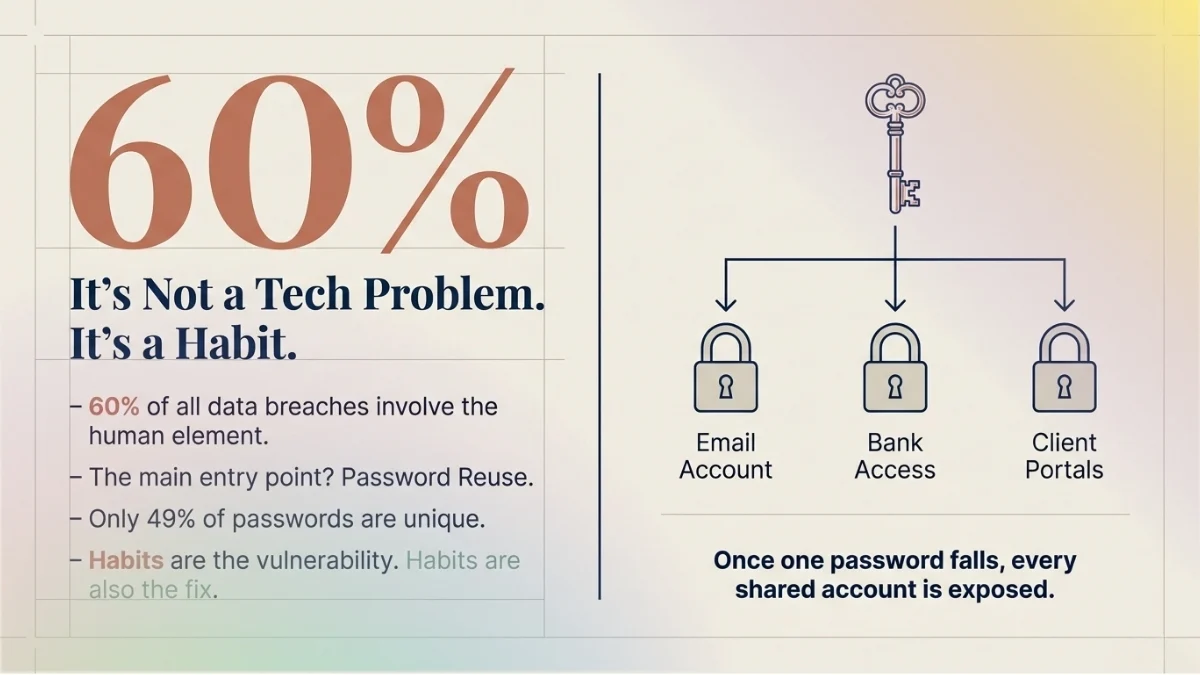
The best password manager for freelancers who manage logins for multiple client accounts is whichever one they will actually use every day. The Verizon DBIR 2025 found that in the median case, only 49% of a user’s saved passwords across different services were unique from each other. That means for every two logins, one password is likely repeated somewhere else. Once that password appears in a breach, every account sharing it is exposed.
Bitwarden is fully open-source, stores unlimited passwords across unlimited devices on the free plan, and uses AES-256 encryption. It has been independently audited by security firms. The premium plan, which adds 2FA integration and vault health reports, costs $10 per year.
1Password is the stronger choice for freelancers who occasionally share credentials with clients or sub-contractors. It includes a Travel Mode that hides specific vaults when crossing borders, useful for anyone doing international client work. The individual plan starts at around $2.39 per month billed annually.
Both tools solve the core problem the DBIR data keeps confirming: password reuse is the main door attackers walk through.
Official sites: bitwarden.com | 1password.com
Two-Factor Authentication Setup Guide for Self-Employed Professionals in 2026
Two-factor authentication is the single cheapest and most effective step on this entire list. It costs nothing. It takes under an hour to set up everywhere it matters. According to IBM’s 2025 report, phishing remains the most common attack vector at 16% of all breaches — 2FA breaks the chain even when a password is successfully stolen.
The Verizon DBIR 2025 flagged a rise in MFA bypass techniques including prompt bombing and adversary-in-the-middle attacks, which means push notification-based 2FA is weaker than it used to be. App-based authentication, using Google Authenticator or Authy — generates a time-based code locally on your device, which is harder to intercept than a text message or push notification.
Set it up on: Gmail or your email provider, LinkedIn, your freelance platform accounts, PayPal or Stripe, any project management tool, cloud storage platforms, and your domain registrar. Those eight platforms cover the accounts most likely to be targeted.
Authy backs up your 2FA tokens and works across multiple devices — important if you switch between a phone and tablet. Google Authenticator is more minimal and directly integrated with Google Workspace.
Official sites: authy.com | support.google.com/accounts
VPN: Digital Security Tools for Remote Workers on Shared Networks
Every connection made over public Wi-Fi — a co-working space, a coffee shop, an airport — is readable by anyone on the same network without a VPN. That includes credentials being submitted to client portals, files being uploaded, and emails being sent.
A VPN encrypts that traffic between your device and the internet. It does not make you anonymous, and it does not protect against phishing. What it does is prevent anyone sitting on the same network from intercepting your data in transit.
ProtonVPN is built by the team behind Proton Mail, operates under Swiss privacy law, and has been independently audited. The free plan covers unlimited data across servers in three countries — no logs, no selling of browsing data. The paid Proton Unlimited plan, which bundles VPN, encrypted email, calendar, cloud storage, and a password manager, runs at $9.99 per month billed monthly or less on annual billing.
NordVPN is the better option for freelancers who need consistent speed on client video calls or large file uploads. With over 6,400 servers across 111 countries, speed variance is lower than most providers. Pricing starts at $3.39 per month on a two-year plan.
For cybersecurity for work from home professionals who are always on a known, trusted home network, a paid VPN is optional. For anyone working from shared networks more than twice a week, it is not.
Official sites: proton.me/vpn | nordvpn.com
Encrypted Email: Protecting Sensitive Client Communication
Standard email — Gmail, Outlook, Yahoo — is not end-to-end encrypted. The provider can read it, and an attacker who intercepts it between servers can too. For most freelancers sending general project updates, this is a low-risk situation. For freelancers handling legal documents, financial data, healthcare records, or proprietary business information from enterprise clients, it is a real exposure.
Proton Mail encrypts messages end-to-end, meaning only the sender and recipient can read them. The free plan includes 1 GB of storage and up to 150 messages per day. It integrates with Proton Calendar and Proton Drive, keeping the entire communications workflow within one encrypted environment.
Even for freelancers who keep their primary Gmail account, using Proton Mail as the designated channel for sensitive client correspondence — contracts, financial discussions, proprietary briefs — is a practical middle ground.
Official site: proton.me/mail
Malware Protection: Online Security Software Self-Employed Professionals Often Skip
IBM’s 2025 report noted that human error accounts for 26% of breaches, often through misconfigured systems or downloading compromised files. Freelancers regularly receive files from clients they have not worked with before — briefs, reference images, design assets, spreadsheets. Any of those can carry malware.
On Windows 10 and 11, Windows Defender runs in the background by default and handles real-time protection competently for most use cases. AV-TEST, an independent testing institute, consistently rates it as a solid baseline. Adding Malwarebytes Free for periodic on-demand scans covers the gap — particularly for adware and potentially unwanted programs that slip past default protection.
For Mac users, Malwarebytes Free is similarly useful. macOS has built-in protections, but they do not catch everything, especially newer threats targeting the growing base of macOS users.
Official site: malwarebytes.com
Breach Monitoring: Data Protection Tools Solopreneurs Overlook the Most
Have I Been Pwned is a free service run by security researcher Troy Hunt that checks whether your email address has appeared in any known data breach. Enter your email, see every breach it has appeared in, what data was exposed, and when.
Set up free monitoring alerts while there. The moment a new breach includes your email address, you get notified. That early warning gives you time to change passwords, review accounts for unauthorized access, and notify clients if necessary — before an attacker does anything with the data.
This is one of the most underused data protection tools available to solopreneurs, and it takes about three minutes to set up.
Official site: haveibeenpwned.com
File Encryption: Protecting Client Data Stored in the Cloud
Standard cloud storage — Dropbox, Google Drive, OneDrive — encrypts data in transit and at rest, but the platform itself holds the encryption keys. That means the provider can access your files, and a sufficiently serious legal request can compel them to hand data over.
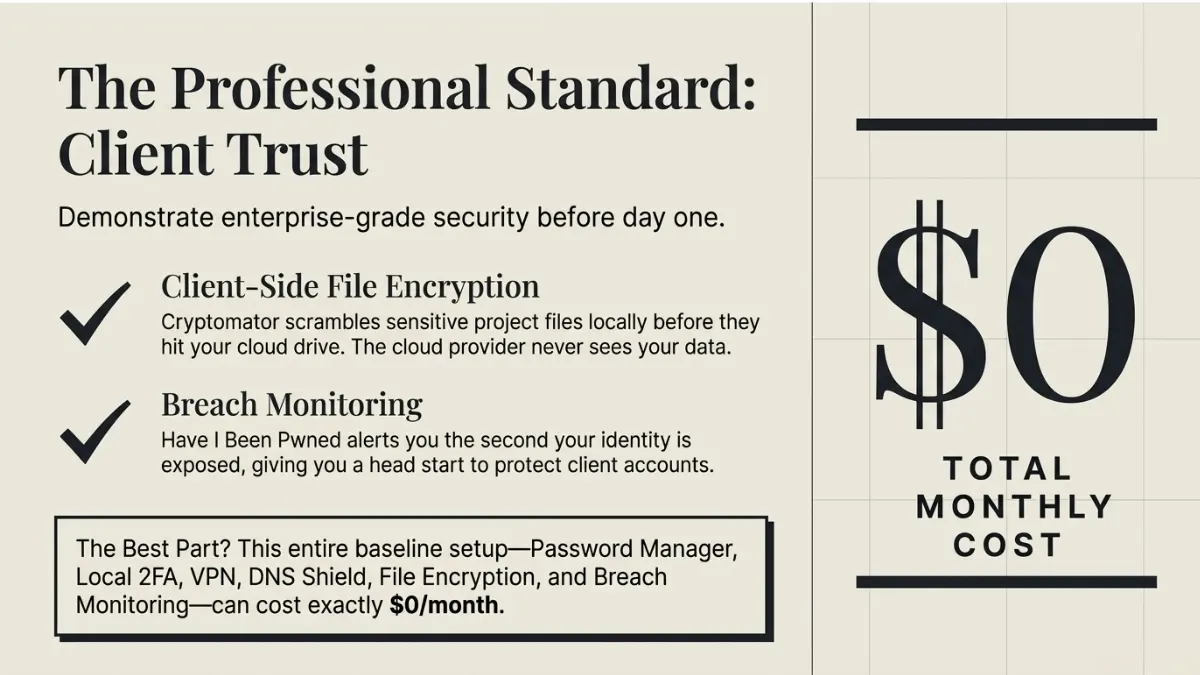
Cryptomator solves this with client-side encryption. Files are encrypted locally on your device before they are ever uploaded. The cloud platform stores only scrambled data. The desktop application is free and available on Windows, Mac, and Linux. A one-time fee of $14.99 covers the mobile app.
For freelancers working with enterprise clients, this is the kind of extra step that shows up positively in vendor security reviews. It takes about fifteen minutes to set up and works with any cloud provider already in use.
Official site: cryptomator.org
DNS Security: A Fast Zero-Effort Layer for the Best Free Cybersecurity Tools for Freelancers Working with Sensitive Client Data in 2026
Cloudflare WARP replaces the default DNS resolver on a device with Cloudflare’s 1.1.1.1, which blocks known malicious domains before a browser even loads them. Setup takes about two minutes. It is free. It requires no ongoing management.
What this means practically: if a phishing link leads to a known malicious domain, WARP blocks the connection before any credential input happens. It does not replace a VPN or antivirus, but it adds a fast, low-friction layer that catches a category of threats the other tools do not.
Official site: one.one.one.one
Cybersecurity Checklist for Freelancers Before Onboarding a New Enterprise Client
Enterprise clients increasingly ask freelancers to demonstrate basic security practices before granting access to internal systems. Even when they do not ask directly, the question is implicit — can this person be trusted with our data?
Run through this before signing any contract involving access to client systems, data, or proprietary information:
- Confirm how files and credentials will be shared — avoid plain email attachments for anything sensitive
- Enable 2FA on every account the client gives access to before the first day of work
- Store client login credentials only inside your password manager vault
- Set up a dedicated encrypted folder in Cryptomator or ProtonDrive for their project files
- Clarify the client’s breach notification expectations upfront — know your obligations before you need to act on them
- Run your email through Have I Been Pwned and resolve any flagged exposures before access begins
This checklist takes less than an hour. The cost of skipping it — in client trust, legal exposure, and potential liability — is not recoverable.
What This Setup Actually Costs
The free version of this stack — Bitwarden free, ProtonVPN free, Proton Mail free, Windows Defender, Malwarebytes Free, Google Authenticator or Authy, Have I Been Pwned monitoring, Cloudflare WARP, and Cryptomator desktop — costs nothing.
A paid upgrade that adds 1Password individual ($2.39/month), NordVPN ($3.39/month), and Proton Mail Plus ($3.99/month) brings the full monthly total to under $10.
IBM’s 2025 report found that organizations using AI and automation extensively in security operations saved an average of $1.9 million in breach costs compared to those that did not. The scale is different for a solo operation, but the logic is identical: preventive tools cost far less than recovery.
Our Research Sources
- IBM 2025 Cost of a Data Breach Report — official IBM newsroom (July 30, 2025): newsroom.ibm.com
- IBM: What Is a Data Breach (updated January 2026): ibm.com/think/topics/data-breach
- Verizon 2025 Data Breach Investigations Report (official): verizon.com/business/resources/reports/dbir
- Verizon 2025 DBIR — credential stuffing supplemental research: verizon.com/business/resources/articles/credential-stuffing-attacks-2025-dbir-research
- Have I Been Pwned: haveibeenpwned.com
- Bitwarden: bitwarden.com
- 1Password: 1password.com
- Proton (VPN, Mail, Drive): proton.me
- NordVPN: nordvpn.com
- Malwarebytes: malwarebytes.com
- Cryptomator: cryptomator.org
- Cloudflare WARP: one.one.one.one
- Authy: authy.com







2 thoughts on “The Best Cybersecurity Tools for Freelancers in 2026 Are Not Expensive”